Showing posts with label Nokia Solutions. Show all posts

New Microsoft Nokia 230 Rm-1172 Complete Keypad Jumper Ways Solution 100% Tested By imobilecat Member,Nokia 230 rm-1172 Keypad Not Working Solution,Nokia 230 Keypad Ways,Nokia 230 Keypad Jumper Ways Solution,New Microsoft Nokia 230 Keypad Ways,World 1st Nokia 230 Keypad Jumper Ways Solution,Don't Miss This Solution Most Famous Solution Online If You Trace Any Key Of Nokia 230 Keypad So Don't Worry About This We Have All Circuit Diagram Of Nokia 230 Rm-1172 Keypad For Easy Tracing,So Check Our Tracing Diagram Of Nokia 230 Keypad So Like Our Blog For More Premium Solution To Earn More Money,Please Subcribe Our Blog For More Latest News Letter.
Every repairing solution posted here is tested by at least one member of iMobilecat team. Use the information available here at Your Own Risk. We are not responsible if any harm comes to your device during the repairing process.
Microsoft Nokia 230 Keypad Jumper Ways Solution
Nokia 230 Rm-1172 Keypad Jumper Diagram

 Solution For

New Nokia 230 Keypad Ways.
Microsoft Nokia 230 Keypad Jumper Ways.
Nokia 230 rm-1172 Keypad Not Working.
Nokia 230 Rm-1172 Keypad Jumper Ways Solution.

Hello Everyone Today We Share Complete Hardware Solution Of Nokia 215 rm-1110 Like No Display Light Solution,Nokia 215 rm-1110 Not Charging Nokia 215 rm-1110 No Charging Response,Nokia 215 rm-1110 Fake Charging,Nokia 215 rm-1110 Charging Not Save,Nokia 215 rm-1110 Insert Sim Jumper Ways Solution,Nokia 215 rm-1110 Sim 1 Not Working,Nokia 215 rm-1110 Sim 2 Not Working ,Nokia 215 rm-1110 Complete Insert Sim Solution,Nokia 215 rm-1110 Memory Card Not Working,Nokia 215 rm-1110 mmc Jumper Ways Solution,Nokia 215 rm-1110 Schematic Circuit Diagram,Nokia 215 rm-1110 Hang On Nokia Logo Solution,Nokia 215 rm-1110 Stuck On Logo,Nokia 215 rm-1110 No Power On Solution,Nokia 215 rm-1110 Dead Solution,Nokia 215 rm-1110 Mic Jumper Ways Solution,Nokia 215 rm-1110 Ringer Speaker Jumper Ways Solution,
Every repairing solution posted here is tested by at least one member of iMobilecat team. Use the information available here at Your Own Risk. We are not responsible if any harm comes to your device during the repairing process.
 Nokia 215 rm-1110 Full Short Solution,Nokia 215 rm-1110 Battery Terminal Ways,Nokia 215 rm-1110 Battery Connector Ways,Nokia 215 rm-1110 Torch Light Solution,Nokia 215 rm-1110,Nokia 215 rm-1110 No Network Solution,Nokia 215 rm-1110 Low Signal Solution,Nokia 215 rm-1110 Usb Connector Jumper Ways Solution.
Nokia 215 Complete Repairing Solution
Nokia 215 Rm-1110 Complete Hardware Solution Pack By iMobilecat

Microsoft Nokia Lumia 435 Rm-1070 Complete Dual Insert Sim Jumper Ways Solution,First Trace Fault In Sim Card Or Fault In Mobile Phone For Tracing Fault Follow Me.

  • Replace Sim Card Other One
  • After Replace Sim Card Show Insert Sim Massage.
  • Disassemble Nokia Lumia 435 Rm-1070.
  • Clean Logic Board (Main Board) With C.T.C Cleaner Or Other One.
  • Check All Related Components And Circuit Diagram. 
  • Nokia Lumia 435  Dual Sim Related Circuit Diagram Available In Below Image.
Every repairing solution posted here is tested by at least one member of iMobilecat team. Use the information available here at Your Own Risk. We are not responsible if any harm comes to your device during the repairing process. 
Nokia Lumia 435 Rm-1070 Complete Sim Solution
Microsoft Lumia 435 Rm-1070 Dual Sim Circuit Diagram

New Microsoft Nokia 105 Rm-1133,Rm-1134 Ringer Jumper Ways Solution And Earpiece Complete Jumper Ways Solution First Check Fault Of Nokia 105 Rm-1133 Ringer Problem Or Earpiece If Fault In Ringer Before Repair Mobile First Check Ringer Function From Mobile Menu Or Nokia 105 Rm-1133 Hard Reset (Factory Reset) After Reset Nokia 105 Rm-1133 Fault Still There Then Teardown Nokia 105 Rm-1133 Clean PCB Layout With Professional Cleaner Like C.T.C Cleaner Or Other After Clean Logic Board of Nokia 105 Rm-1133 Check Ringer Or Replace New One After Replace Ringer Fault Still There Then Check Circuit Diagram Of Nokia 105 Ringer.

  1. Replace Ringer.
  2. Check Ringer Components.
  3. Check Circuit Diagram.
  4. We Posted Related Circuit Diagram In Below Image.
Every repairing solution posted here is tested by at least one member of iMobilecat team. Use the information available here at Your Own Risk. We are not responsible if any harm comes to your device during the repairing process.

Nokia 105 Earpiece And Ringer Jumper Ways Solution.
Circuit Diagram Of Nokia 105 Rm-1133 Ringer Plus Earpiece
Nokia 105 rm-1133,rm-1134 Ringer Not Working.
Microsoft Mobile 105 Ringer Speaker Jumper Ways Solution.
New Nokia 105 Dual Sim Ringer Speaker 100% Tested Solution.

Today We Share New Microsoft Nokia 105 Rm-1134 Complete Lcd Light And Display Solution,Nokia 105 Dual Sim No LCD Light Solution,Nokia 105 Rm-1134 Complete LCD Jumper Ways Solution Nokia 105 Dead Solution,New Nokia 105 Dual Sim Display Light Not Working Solution,Nokia 105 White Display Solution,Nokia 105 Dual Sim Blank Display Solution,Nokia 105 Rm-1134 White LCD Solution.
Every repairing solution posted here is tested by at least one member of iMobilecat team. Use the information available here at Your Own Risk. We are not responsible if any harm comes to your device during the repairing process.


New Nokia 105 Dual Sim Mic Problem Jumper Solution If Mic Not Working While Make Outgoing And Incoming Call First Reset Or Reinsert Battery After Reset Nokia 105 DS Fault Still There Then Disassemble Nokia 105 DS Mobile And Clean With C.T.C Cleaner Then Check All Mic Related Components Or Circuit Diagram First Remove Old Mic And Check Nokia 105 Dual Sim Mic Circuit With Multi meter If Problem In Circuit So Make Jumper With Jumper Wire.

Fault Type.

  • Nokia 105 Dual Sim Mic Not Working During Make Call.
  • Nokia 105 Mic Not Working.
  • Nokia 105 DS Mic Jumper Ways Solution
  • Nokia 105 Rm-1134 Mic Ways.
  • Microsoft Nokia 105 Mic Jumper Solution.
  • New Nokia 105 Mic Jumper Ways Solution.
Every repairing solution posted here is tested by at least one member of iMobilecat team. Use the information available here at Your Own Risk. We are not responsible if any harm comes to your device during the repairing process.
Microsoft Nokia 105 Rm-1134 Mic Ways Solution.
Nokia 105 Rm-1134 Complete Mic Jumper Ways

Hello To All User Today We Share New Microsoft Nokia 105 RM-1133 + RM-1134 Complete USB Jumper Ways Solution And Nokia 105 DS Complete Charging Jumper Ways 100% Tested Solution Best Way To Repair Nokia 105 DS Complete Charging Solution Jumper Ways,Nokia 105 DS Charging Jumper,Nokia 105 DS Charging Solution,Nokia 105 DS Not Charging Solution,Nokia 105 DS Complete Charging Ways.
Every repairing solution posted here is tested by at least one member of iMobilecat team. Use the information available here at Your Own Risk. We are not responsible if any harm comes to your device during the repairing process.

Nokia 105 DS Charging Jumper
Nokia 105 DS Complete Charging Circuit Diagram

Microsoft Nokia 105 DS RM-1134 Complete Charging Solution,Nokia 105 DS Charging Ways,Nokia 105 ds USB Jumper Ways Solution

Today Finally We Post New Microsoft Nokia 105 Rm-1133 Complete Insert Sim Solution New Nokia 105 Dual Sim Have Insert Sim Problem So Don't Worry We Have Solution About This Fault Like Microsoft 105 Rm-1133 Insert Sim Problem,Microsoft 105 Rm-1133 Sim Not Working Solution,After Inserted Sim Show Insert Sim Microsoft 105 Sim Jacket Damage Solution,Microsoft Nokia 105 Insert Sim Ways.
Every repairing solution posted here is tested by at least one member of iMobilecat team. Use the information available here at Your Own Risk. We are not responsible if any harm comes to your device during the repairing process.

Microsoft Nokia 105 ds Sim Slots

Repair Microsoft Nokia 105 Insert Sim Fault.

  1. DisassembleMicrosoft Nokia 105 ds Rm-1133-1134
  2. After Disassemble Mobile Clean Logic Board With Proffesional Cleaner Like (C.T.C).
  3. Check If Nokia 105 Ds Sim Slot Damage Replace New One.
  4. if fault In Circuit Diagram Check Ways In Diagram.
microsoft Nokia 105 Rm-1133 insert Sim Solution


Microsoft Nokia 230 Rm-1172 Full Lcd Track Jumper Ways Solution,New Nokia 230 Rm-1172 No Display Solution,And Microsoft Rm-1172 Blank Display Solution,New Microsoft Mobile 230 Rm-1172 No Display Show But Mobile All Working Well,More Explain About Nokia 230 Rm-1172 Lcd Not Working.

How To Repair Microsoft Nokia 230 Rm-1172 LCD Display.


  1. First Check n Change Lcd Display If Problem Still There Then Read 2nd Option.
  2. Disassembly Microsoft Nokia 230 Rm-1172 For Complete Solution Of No Display Or White Display.
  3. After Disassembly Clean All PCB Layout Of Nokia 230 With Alcohol Or Other One Like C.T.C Cleaner.
  4. Check All Components And Circuit Diagram In LCD Display Section Of Microsoft Nokia 230 Rm-1172.
  5. Wash Lcd Connector With C.T.C Cleaner If Problem Still There Check Below Picture For Complete Display Solution Of Microsoft Nokia 230 Rm-1172.
 Every repairing solution posted here is tested by at least one member of iMobilecat team. Use the information available here at Your Own Risk. We are not responsible if any harm comes to your device during the repairing process.
Microsoft Nokia 230 White Lcd Display Solution
Nokia 230 Rm-1172 Complete Lcd Display Path Ways

Solution For :

Microsoft Nokia 230 Rm-1172 No Display Solution.
New Nokia 230 Rm-1172 White Lcd Display 100% Tested Solution.
Microsoft 230 Rm-1172 Blank Lcd Display Problem Solution.
New Nokia 230 Rm-1172 Complete LCD Display Jumper Ways Solution.

New Microsoft Nokia 225 Complete LCD Display And Keypad Light Problem Jumper Ways Solution,Nokia 225 Black LCD Solution,Nokia 225 Completely Working But No Display Show On Lcd Before Hardware Repairing First Check Dispaly Setting On Mobile Or Nokia 225 Hardrest,Nokia 225 Flash With Latest Flash File,After Full Flash Fault Still There Then Completely Sure Fault In Hardware,

How To Repair Nokia 225 Display Light.

  1. First Nokia 225 Disassemble (Click Here For How To Disassemble Nokia 225).
  2. After Disassemble Nokia 225 Clean PCB Layout With C.T.C Cleaner.
  3. Check Nokia 225 LCD And All Circuit Diagram And Components With (Multi meter).
  4. Here We Have Circuit Diagram About Nokia 225 Display Light Related.
  5. Check Below Image Of Circuit Diagram For Complete Solution Of Nokia 225 Display + Keypad Light Solution.
 Every repairing solution posted here is tested by at least one member of iMobilecat team. Use the information available here at Your Own Risk. We are not responsible if any harm comes to your device during the repairing process.
Nokia 225 Final Display Light Solution
Nokia 225 Final LCD Light Solution 
Thank You For Visiting Here . If You Have Any Problem About This Circuit Diagram Solution Of Nokia 225 LCD Display Light Feel Free To Contact Us Or Leave Comment Here In Below Comment Box.

Today We Share New Microsoft Nokia 230 Rm-1172 Complete MMC (Multimedia Card) Jumper Ways Solution Nokia 230 MMC Not Working,Memory Card Not Read Solution,Memory Card Show But No Formated No Read Data From Memory Card Of Nokia 230 Rm-1172.

How To Repair Nokia 230 Rm-1172 MMC :

  1. Disassembly Nokia 230 Rm-1172 With Related Hardware Tools.
  2. After Disassembly Clean Nokia 230 Rm-1172 PCB Layout With C.T.C Cleaner Or Other Liquid.
  3. After Clean Check All MMC Related Components And Circuit Diagram Of Microsoft 230 Rm-1172 With Multi Meter.
  4. Microsoft Nokia 230 MMC Problem Solution Circuit Diagram In Below Figure So Follow That Image. 
Every repairing solution posted here is tested by at least one member of iMobilecat team. Use the information available here at Your Own Risk. We are not responsible if any harm comes to your device during the repairing process.
Microsoft Nokia 230 Rm-1172 MMC Solution.
Nokia 230 Rm-1172 MMC Jumper Ways Solution

Solution For :

New Nokia 230 Rm-1172 MMc Jumper Ways Solution.
Microsoft Nokia 230 Rm-1172 Memory Card Jacket Problem.
Nokia 230 Rm-1172 Memory Card Ok But Show Format First.
Nokia 230 Rm-1172 MMC Repair Circuit Diagram.

Welcome To Our Blog Today We Share New Microsoft Nokia 130 Rm-1035 Complete Repairing Solution Like Nokia 130 rm-1035 Display Light Jumper Ways Solution,Nokia 130 rm-1035 Complete White Lcd Jumper Ways Solution,Nokia 130 Rm-1035 Blank Display Ways Nokia 130 rm-1035 Full Short Solution,Nokia 130 rm-1035 MMC Problem Jumper Ways Solution,Nokia 130 rm-1035 Complete Insert Sim Jumper Ways Solution,Nokia 130 rm-1035 Battery Terminal Jumper Ways,Nokia 130 Dead Solution,Nokia 130 rm-1035 No Power On Solution,Nokia 130 rm-1035 Complete Charging Jumper Ways Solution,Nokia 130 rm-1035 Fake Charging Solution,Nokia 130 rm-1035 Charging Not Save,Nokia 130 rm-1035 Ringer Speaker Problem Jumper Ways Solution,Nokia 130 Mic Not Working,Nokia 130 em-1035 Mic Jumper Ways Solution. Complete Repairing Solutions Of Nokia 130 Rm-1035.
Every repairing solution posted here is tested by at least one member of iMobilecat team. Use the information available here at Your Own Risk. We are not responsible if any harm comes to your device during the repairing process.

How To Repair Nokia 130 Rm-1035 :

  1. Nokia 130 Disassembly.
  2. Clean PCB Layout Of Nokia 130 Rm-1035 With C.T.C Cleaner Or Other.
  3. Check Circuit Diagram Related Fault Area Like Ringer,Earpiece,Charging,Sims,Short,MMC,Battery Terminal,Dead.
  4. We Share All Type Of Nokia 130 Hardware Solutions Circuit Diagram In Below Image.
  5. Don't Forget To Like Us.If You Have Any Problem About Nokia 130 Circuit Diagram Feel Free To Contact Us At Imobilecat@gmail.com   Or Leave Comment Here.

Microsoft Nokia 130 Rm-1035 Complete Hardware Solutions
Microsoft Nokia 130 Rm-1035 Complete Hardware Solution Pack

Solution For :

Nokia 130 Rm-1035 Complete Sim Ways.
Nokia 130 Rm-1035 Sim Jumper Ways.
Nokia 130 Rm-1035 Insert Sim Solution.
Rm-1035 Sim Not Working Solution.
Nokia 130 Rm-1035 Complete Chrging Solution.
Nokia 130 Rm-1035 Full Lcd Jumper Ways Track Solution.
Nokia 130 Rm-1035 Blank LCD Display Ways.
Nokia 130 Rm-1035 Full Short Solution.
Nokia 130 No Power On Solution.
Nokia 130 Hang On Logo Solution.
Nokia 130 Rm-1035 Dead Solution.
Nokia 130 Rm-1035 MMC Jumper Ways Solution.
Nokia 130 Rm-1035 Battery Terminal Jumper Ways.
Nokia 130 Rm-1035 Complete Jumper Ways Solution.
Nokia 130 Rm-1035 Mic Jumper Ways Solution.

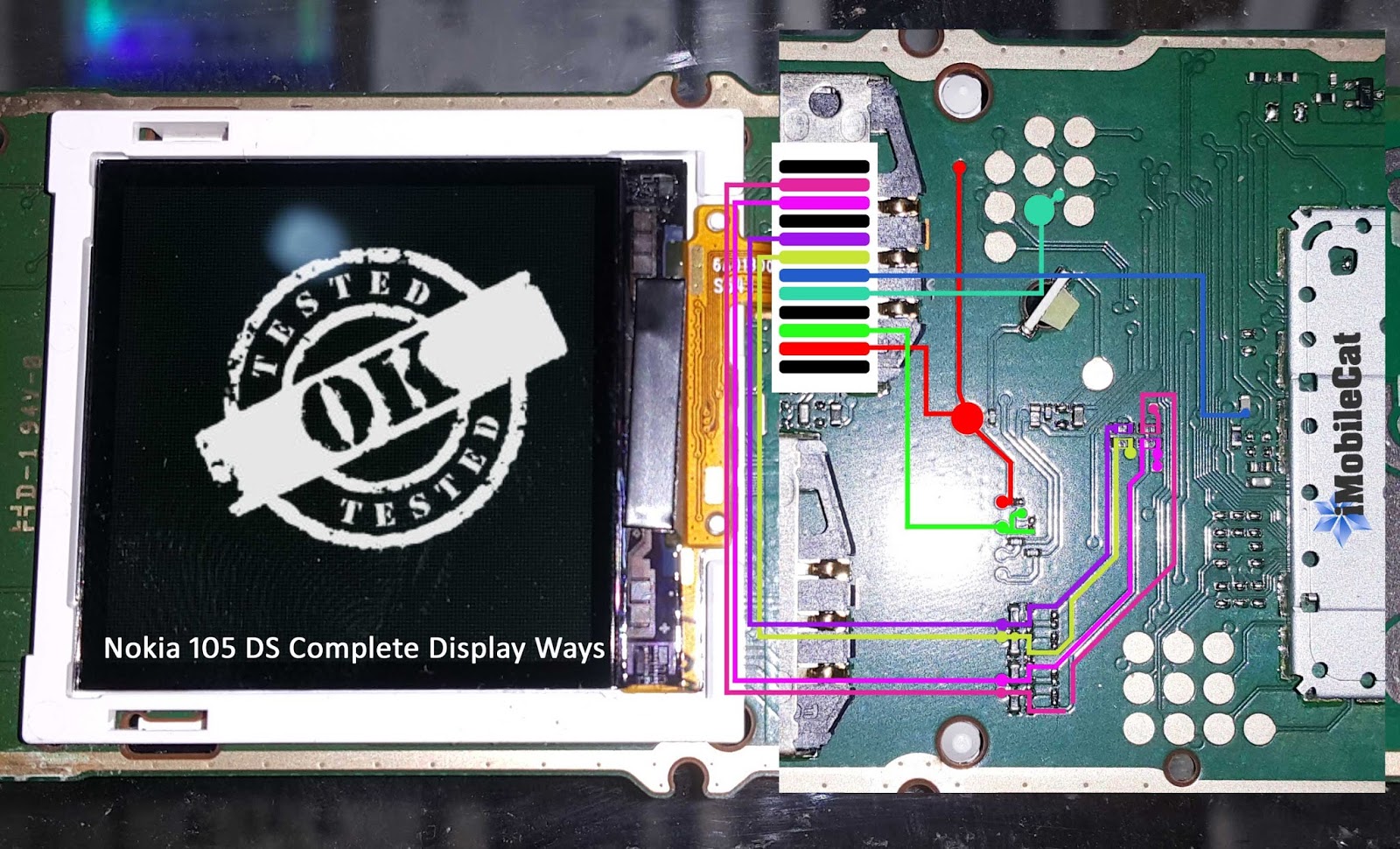
Nokia 130 Complete Lcd Jumper Ways Solution
New Nokia 130 Rm-1035 Complete Display Ways

Hey Mobile Technician We Have Tested 100% Working  New Nokia 230 Rm-1172 Mic Problem Jumper Ways Solution Only For Our Best Cellphone Technician,We Give You This Solution In Few Working Method So Follow Our New Microsoft Nokia 230 Rm-1172 Mic Problem Solution Jumper Ways Circuit Diagram Our Team Hard Working To Find Problem Solution Of Brand Mobiles Or Other Chinese Clone, Make More Money With Us.


So Follow Few Working Steps For New Nokia 230 Rm-1172 Mic Problem Solution.
  1. Check Mic Open Mobile Menu >Apps>Voice Recorder After Run Voice Recording App On Mobile Click On Record Button Then Record Your Own Voice For Testing Mic Of Nokia 230 Rm-1172 If No Voice Record /so Technician Sure To Mic Problem.
  2. For Repair Mic In Hardware Tear down Or Disassembly Microsoft 230 Rm-1172 With Supported Tool.
  3. After Complete Teardow/Disassembly Nokia 230 Rm-1172 Clean PCB Layout With C.T.C Cleaner Or Other Wash All PCB 
  4. After Clean PCB Layout Of Nokia 230 Rm-1172 Then Check All Related Circuit Diagram And Related Components Like Fuse,Coil,Capacitor.
  5. So Don't Worry About Circuit Diagram Of New Microsoft Nokia 230 Rm-1172 Mic Related Follow Our New Nokia 230 Rm-1172 Mic Related Traced Circuit Diagram In Below Figure.
Every repairing solution posted here is tested by at least one member of iMobilecat team. Use the information available here at Your Own Risk. We are not responsible if any harm comes to your device during the repairing process.
New Nokia 230 Rm-1172 Mic Jumper Ways Solution
New Microsoft Nokia 230 Rm-1172 Mic Circuit Diagram.

Thank You For Visiting Here Have Any Problem About This Circuit Diagram Feel Free To Contact Us.Imobilecat@gmail.com Or Leave Comment In Below Comment Box.

New Solution Of Microsoft Nokia 230 Rm-1172 Complete Dual Insert Sim Solution Complete Microsoft Nokia 230 Sim Ways Jumper Dual Sim Track 100% Tested Solution,This Solution for Microsoft Nokia 230 Rm-1172 Sim 1,Sim 2 Point Missed Or Damage Jumper Ways Solution,Nokia 230 Rm-1172 Insert Sim Problem,
First Of All Check Your Sim Card If Sim Card Damage So Replace This One From Related Telecom Company Or Other One,If Sim Card Ok Then Deassemble Microsoft Nokia 230 Rm-1172 After Complete Disassembling Clean All PCB Layout Of Microsoft Nokia 230 Rm-1172 With CTC Cleaner
After Clean Complete PCB Layout With CTC Then Check All Circuit Diagram With Multimeter And Check Components Sim Related So We Have Microsoft Nokia 230 Rm-1172 PCB Layout Sim Related We Below Show You Circuit Diagram Or Nokia 230 Rm-1172 Check This One.
Every repairing solution posted here is tested by at least one member of iMobilecat team. Use the information available here at Your Own Risk. We are not responsible if any harm comes to your device during the repairing process.
Microsoft Nokia 230 Dual Sim Solution

 Solution For :

Microsoft Nokia 230 Rm-1172 Sim 1 Solution.
Nokia 230 Rm-1172 Sim 2 Solution
Nokia 230 Rm-1172 Insert Sim Complete Jumper Ways.
Microsoft 230 Insert Sim Problem Solution.
Nokia 230 Rm-1172 Insert Sim Jumper Ways Solution
Microsoft 230 Sim Circuit Diagram (PCB Layout).
[right-side]


Hey Guys We Share Today Microsoft Nokia 230 LCD Display Light Solution,If Microsoft Nokia 230 Mobile Black Display Or No Display Jumper Ways Track Tested Solution With Us.Lighting Or Dark Screen Display But The Incoming Call’s & Keypad Tone Are Working. This Problem Is Cause By The Backlight LED On The LCD That is Not Working Or Doesn’t Light Up.

Solution For :

Microsoft Nokia 230 Display Light Solution.
Nokia 230 Rm-1172 No Display Light.
Microsoft Nokia 230 Black Display.
Nokia 230 Rm-1172 LCD Backlight Solution.
Nokia 230 No Display Light (No Display).
Nokia 230 Lcd Light Blinking.

Nokia 230 No Display Light Solution By Factory Reset.

First Of All Nokia 230 Hard reset Or Factory Reset Or Format With Flasher Tool Like Supported Tool How To Factory Reset Or Full Flash Or Format Of Microsoft Nokia 230 Rm-1172 With Infinity Box. Check Below Video For How To Hard Reset Or Full Flash Or Format Factory Area.
https://www.youtube.com/embed/gnysU2M4wcc

Microsoft Nokia 230 Backlight Solution Hardware.

  1. Deassemble Nokia 230 After Deassemble.
  2. Clean All Circuit Board With (CTC) Cleaner.
  3. Then Check All Display Light Circuit Diagram With Multimeter(Ohm Meter)
  4. And Finally Check Display Related Components Like LCD,Coil,Fuse,Capacitor,Transistor etc.
We Have Circuit Diagram Of Nokia 230 Rm-1172 Display Light Related,So Don't Worry About Circuit Diagram Of Microsoft Nokia 230 Rm-1172 Display Light,Dark Display,Black Display,Display Backlight.
Check Below Image Of Nokia 230 Circuit Diagram Display Related.
Microsoft Nokia 230 rm-1172 Display Circuit Diagram
More Further Information Contact Us.imobilecat@gmail.com Or Leave Comment Here

New Nokia 230 Complete Ringer And Earpiece Solution

Solution For Nokia 230 Ringer And Earpiece New Microsoft Mobile 230 Rm-1172 Ringer Speaker Ways Jumper Solution Complete Ringer EarpieceWays Of Microsoft Mobile 230 Rm-1172 Complete Circuit Diagram Of New Nokia 230 Ringer Speaker Mean To Say Complete Audio Solution
Don't Forgot To Say Thank's Us For This Solution Let's Start For 100% Solution Of Nokia 230 Rm-1172 Ringer And Earpiece 

Nokia 230 Deassemble First

First Of All After Deassembly Clean All PCB Board With (CTC Cleaner) If Mobile Water Damage Then Check All Related Components And Ways With Ohm Meter Components Like Capacitor,Resistor,Coil,Fuse And Ways Like Wiring Circuit Diagram If You Don't Have Circuit Diagram About This Problem Don't Worries About This We Have Circuit Diagram In Below Space.Check It.

Every repairing solution posted here is tested by at least one member of iMobilecat team. Use the information available here at Your Own Risk. We are not responsible if any harm comes to your device during the repairing process.
Nokia 230 Ringer Speaker Solution
New Nokia 230 Rm-1172 Ringer Earpiece Solution
If Any Problem About This Solution So Feel Free To Contact Us Or Leave Comment In Below Comment Box Like Blogger And Facebook And Don't Forgot To Say Thanks Us....

Solution For :

Microsoft Mobile 230 Ringer And Earpiece Solution.
Nokia 230 Rm-1172 Ringer Jumper Ways Track.
Nokia 230 Earpiece And Ringer Not Working.
Nokia 230 Ringer Ok But Ringer Circuit Damage.
Nokia 230 Earpiece Ok But No Work Properly.

New Nokia 230 Charging Solution

Hey Guys Nokia 230 Charging Ways Jumper Solution For Our Best Technician,Solution For Nokia 230 Rm-1172 Charging No Response,Nokia 230 Rm-1172 Charging Circuit Short,Nokia 230 Rm-1172 Charger Not Supported..So Lets Start 

Requirement Tools!

  1. T5 ScrewDriver
  2. Mobile Case Opener Tool
  3. Jumper Wire
  4. Soldering Wire
  5. Soldering Iron
First Check Nokia 230 Charging Jack If Charging Jack Have Carbon So Clean With CTC Cleaner Before Teardown De-assemble Nokia 230 Rm-1172,If Problem Still Same Then Deassemble Nokia 230 Rm-1172 And Check All Related Components Ways Diagram We Explain This Solution Below Circuit Diagram
So Don't Worry About This So Check Our Nokia 230 Rm-1172 Board Layout.
Every repairing solution posted here is tested by at least one member of iMobilecat team. Use the information available here at Your Own Risk. We are not responsible if any harm comes to your device during the repairing process.
Best Solution For Nokia 230 Charging Ways
Nokia 230 Complete Charging Ways
If You Have Any Problem About Microsoft 230 Mtk 6260 Charging Ways Jumper Solution So Feel Free To Contact Us Or Leave Comments Below Comments Box  ThankYou For Visiting Here So Don't Forgot To Like This Page.

Solution For :

Nokia 230 Rm-1172 Complete Charging Problem.
Microsoft Mobile 230 Rm-1172 Charging Point Track.
Microsoft Nokia 230 Charging Jumper Ways Solution.
Microsoft Nokia 230 Not Connect With PC.
Microsoft Nokia 230 Charging Point Damage.
Microsoft Nokia 230 D+ D- Point Damage And Track.

Best Solution For Nokia 108 Damage Lcd Point Or Point Missed After Water Damage Microsoft Nokia 108 Complete Display Ways,Nokia 108 Full LCD Path Tracked First Of All Properly Disassemble Nokia 108 With Tool After Complete Disassembly Clean PCB Layout Of Nokia 108 Then Check All LCD Related Circuit Diagram And Components Of Microsoft Nokia 108.
  1. Nokia 108 Complete Lcd Track Ways Jumper.
  2. Nokia 108 final Lcd Ways Solution.
  3. Nokia 108 Complete Blank Lcd Solution
  4. Track Nokia 108 Lcd With Us.
  5. Nokia 108 White Lcd Solution With Our New Diagram.
  6. New Nokia 108 Lcd Ways Track Jumper.
  7. World 1st Complete Diagram Of Nokia 108 Lcd.
  8. Don't Miss Nokia 108 Lcd Complete Track.
  9. Nokia 108 rm-944 White Display Solution.
  10. We Have No Fake Diagram About Any Mobile.  
Repair Most Wanted Fault Of Nokia 108 LCD Missed Point With Us First Of All ThankYou For Visiting Here,This Solution For Demage LCD Point Of Nokia 108 And This Is Complete Solution For Nokia LCD Ways Demage And White (Blank) LCD This Solution Also Recover Dead Nokia 108
Complete LCD Ways World First Solution Of Nokia 108 Dead And Complete LCD Ways
Every repairing solution posted here is tested by at least one member of iMobilecat team. Use the information available here at Your Own Risk. We are not responsible if any harm comes to your device during the repairing process.

Trace damage Most Wanted Lcd Point of nokia 108

Solution For

  • Nokia 108 Complete LCD Ways.
  • Nokia 108 Dead Solution
  • Recover Missed Point Of Nokia 108 LCD
  • If Demage LCD Point Of Nokia 108
  • Nokia 108 No Power On.
  • Nokia 108 Blank (White) LCD Solution

First Of All Welcome To My Blog We Have All Time Hard Working For Best Solution.Today We Share Most Wanted Solution Nokia 108 Hang On Logo And BSI Line Tracking Ways.First Of All Do Full Flash With Latest Firmware If Problem Still On There Then Teardown 108 Handset With Tool And Check BSI Line If BSI Line Demage So We Track This Ways In Below Diagram Of Nokia 108 This Is Final Solution Without Any Risk Other Ways Rehot Or Reflow Mediatek Base CPU + Power Managment IC Don't Forgot To Like Us For More Wanted Solution.
Every repairing solution posted here is tested by at least one member of iMobilecat team. Use the information available here at Your Own Risk. We are not responsible if any harm comes to your device during the repairing process.
Best Hang Solution Of Nokia 108
Thank's To Like Our Blog

Solution For

  • Nokia 108 BSI Line Ways.
  • Nokia 108 Hang On Logo Final Solution.
  • Nokia 108 Still Hang After Full Flash.
  • Nokia 108 Stuck on Logo Full Flash But Same Problem.
  • Nokia 108 No Power On Solution.
  • Nokia 108 New Way To Repair Dead Handset
  • Nokia 108 Hang On Logo Repair In Hardware.
  • We Have No Fake Solution In Our Blog.
  • Don't Miss To Say Thank's For This Hard Work.


H ey Guy We Post Today World First Solution Of Nokia 225 Stuck On Nokia Logo In Hardware Jumper Ways And Nokia 225 BSI Line Track Ways Jumper Solution First Of All Flash Nokia 225 Handset With Latest Firmware If Nokia 225 Have Same Problem Then Try Our Final n World First Nokia 225 Hang On Logo Solution In Hardware. We Hope After Try This Solution All Is Well.And Make Money,And Thanks To All Our Best Technician,We All Time Find Best Solution In GSM World,Don't Forgot To Like Or Thanks Our Technician. To Like This Blog
Every repairing solution posted here is tested by at least one member of iMobilecat team. Use the information available here at Your Own Risk. We are not responsible if any harm comes to your device during the repairing process.
complete solution of nokia 225 hang on logo

Solution For

  • Nokia 225 Stuck On Logo After Water Demage.
  • Best Solution For Nokia 225 Hang On Logo
  • Hang On Logo Nokia 225.
  • Nokia 225 World 1st Hang On Logo Solution.
  • Nokia 225 Full Flash But Same Stuck On Logo.
  • Final Solution Of Nokia 225 Stuck On Logo.
  • Complete Solution For Nokia 225 Hang On Logo.

We All Time Post Free Premium Solution

Shahzad ahmed

{picture#https://lh3.googleusercontent.com/-I7y7M0chr3A/VqybGn0-WNI/AAAAAAAAA8Q/Zd89H33JSpE/h120/avatar.PNG} Smart phone repairing help with our guideline we have most wanted mobile repairing solution pictures and we also provide mobile hardware n software solution on demand {facebook#https://www.facebook.com/profile.php?id=100007320362352} {twitter#https://twitter.com/imobilecat1} {google#https://plus.google.com/u/0/112204119380823533765} {pinterest#https://www.pinterest.com/imobilecat/}